Dieser Artikel ist noch nicht übersetzt, hier ist die englische Version.
How much RAM does a game server really need? Minecraft, Palworld, Rust, Valheim and more
"How much RAM do I need?" is the first question anybody asks before renting a game server, and the answers online range from "2 GB is plenty" to "never less than 16". Both can be right, for different games, different numbers of players and different mods. This article collects what the game makers themselves say, marks clearly where nobody official says anything, and shows how to measure your own server instead of guessing.
A warning about the numbers you will find
Most RAM guides are written by hosting companies, and a hosting company has a reason to suggest a bigger plan. That does not make them wrong, but it means a figure is only as good as its source. In this article, a figure is attributed to the project that publishes it, and where an official figure does not exist, we say so rather than average blog posts and call it a fact.
What the makers publish
| Game | What the official documentation says | Source |
|---|---|---|
| Palworld | 16 GB recommended, with 32 GB or more mentioned for larger servers; 8 GB "is also bootable" but raises the risk of crashes from running out of memory. 4 cores recommended. | Palworld server documentation |
| Rust | 12 GB of free RAM, and "6k map will use more". 15 GB of free disk, SSD or NVMe highly preferred. | Facepunch's Rust wiki |
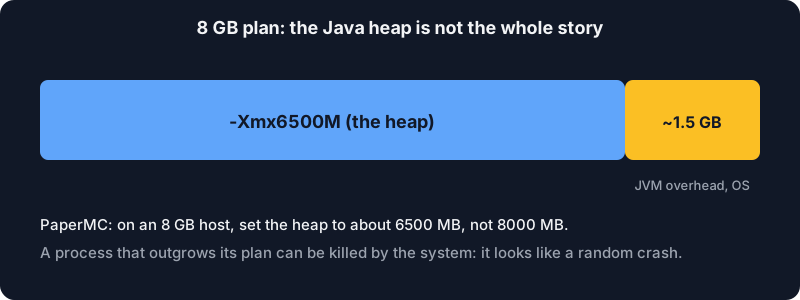
| Minecraft Java (Paper) | No minimum for a small server. For the documented JVM flags, PaperMC recommends "at least 6-10GB, no matter how few players", and says to leave 1000 to 1500 MB of an 8 GB host unallocated. | Aikar's flags in the Paper docs |
| Valheim | The official dedicated server guide gives no hardware requirements. | Valheim dedicated server guide |
| Garry's Mod | The Facepunch wiki page on setting up a dedicated server gives none either. | Facepunch wiki |
Read the table as "what to expect at the top end". Two games publish a big number, one of them with a clear hedge, and two publish nothing. When there is no official figure, the right method is to measure, which we get to below.
A few details worth noting:
- Palworld's own wording matters. "Bootable" at 8 GB is not "comfortable": the people who wrote the server say it works, with a higher chance of an out-of-memory crash. Plan for the recommended figure if the world will grow.
- Rust's number depends on the map. The 12 GB is for a normal map; the wiki says a 6000-size map uses more. A small map for a few friends can sit lower, but the maker does not promise it, so check the usage after a few days of play.
- Minecraft's advice is about the heap, not about need. The Paper page is guidance for tuning the Java garbage collector on servers with memory to spare. It also says that gains stop beyond the right heap size, so more is not always better.
Minecraft: what actually moves the number
Minecraft Java is the case where you control the most, because the load comes from things you can choose.
View distance. Each player is sent every chunk within view-distance of them, a square of (2 x distance + 1) chunks per side. At the default of 10 that is 441 chunks per player; at 16 it is 1089, about 2.5 times more. Our Minecraft server setup guide has the chart and the settings. Lowering the view distance to 8 is the cheapest memory and CPU saving you will find, and for most players barely visible.
Players spread out. Ten players standing together load roughly the same chunks as one; ten players exploring in ten directions load ten worlds' worth. That is why a server feels fine in the evening, then falls over when everyone leaves spawn at once.
Plugins and mods. A handful of well-written plugins cost little. A modpack with hundreds of mods can be heavy on its own before anyone connects; the modpack's author usually states a figure, and that one beats any general guide.
Entities. Farms, animal pens and item frames are updated every tick within the simulation distance. Many entities cost CPU first and memory second.
A sober starting point for a small private Paper server is a heap of a few gigabytes, watched and adjusted. If you go beyond that, set the heap below the memory you actually have, as in the picture below, because the Java process uses more than its heap and the system needs some too.
Why RAM is not always the problem
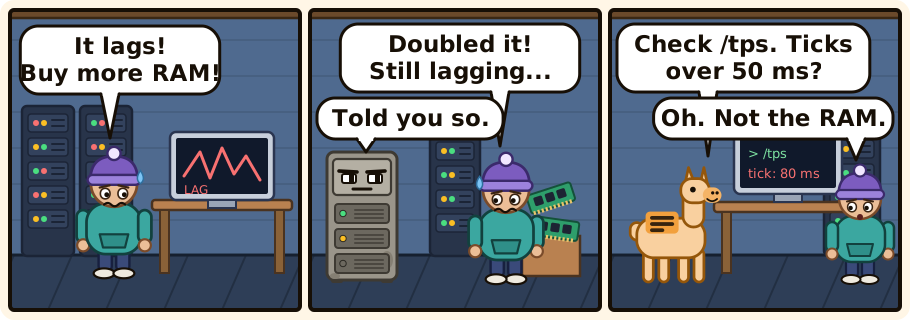
When a server lags, it is tempting to buy more memory. It often does nothing, because the thing that is short is the processor. Game servers do most of their work on one main thread: for Minecraft, 20 ticks per second, which gives 50 ms to do everything in a tick. If one tick takes 80 ms, players feel lag no matter how much memory is free.
Signs that memory is the issue:
- The server's console reports out-of-memory errors, or the process is killed and restarts.
- The garbage collector runs constantly (the server stutters in a rhythm).
- Memory use climbs steadily and never comes back down.
Signs that it is the processor, or the world:
- Plenty of free memory, but ticks over 50 ms (the
/tpscommand in Paper shows it). - Lag that appears when many players load new areas, or when a farm is running.
- Lag that follows a specific plugin or mod after you add it.
Finding which one you have takes ten minutes and can save you the price of an upgrade.
Measure your own server
You do not need special tools. Five minutes after the server has been busy, look at what it really uses.
On a Linux machine:
free -h                # total, used and available memory
ps -o pid,rss,cmd -C java    # resident memory (RSS, in kilobytes) of Java processes
top -o %MEM            # the heaviest processes right now
The available column of free is what counts, not free: Linux uses spare memory as cache and gives it back when needed. The RSS of the server process is its real footprint; for Java it will be above the -Xmx value you set, because Java uses memory outside the heap.
On a hosted server, the panel's resource graphs show the same thing over time. Look at them after a busy evening, not on a quiet Monday morning, and note two numbers: the typical level, and the peak. Your plan should hold the peak with some margin. If the graph touches the limit regularly, you are close to a crash; if it sits at a third of the limit for weeks, you are paying for memory you do not use.
Some practical rules:
- Start with the maker's figure when there is one (Palworld, Rust), and check against reality after a week.
- Start small when there is none (Valheim, Garry's Mod), then watch the graph. Add memory in steps, not by doubling.
- Re-measure when something changes: a new plugin, a bigger map, a modpack update, more players.
- Do not give Java everything. Leave headroom, as the Paper documentation recommends.
- Memory is not the only dimension. Check the processor and the disk too: Rust's documentation, for one, asks for an SSD or NVMe disk.
And what about the free tier?
A free server will not hold a big modpack, a large Rust map or a Palworld world with a full group. That is not a flaw, it is what free means. For a small Minecraft world with friends it is a good place to try Paper, a few plugins and a lower view distance, and to learn what your own numbers are before you pay for anything. Alama's free Minecraft server is meant for that; when you outgrow it, the paid game servers start from the game you pick, and the question to ask is the one this article gave you: what does my server really use at its peak?
The summary
- Official figures exist for Palworld (16 GB recommended, 8 GB bootable) and Rust (12 GB free RAM, more on large maps). Valheim and Garry's Mod publish none.
- Minecraft depends on view distance, how spread out the players are, plugins and mods. The heap must stay below what the machine has.
- More RAM only fixes memory problems. Check the tick time before you upgrade.
- Measure at the busiest moment of your week, and resize from the measurement.