Dieser Artikel ist noch nicht übersetzt, hier ist die englische Version.
How to host a Discord bot 24/7 without babysitting it
A Discord bot that runs on your laptop is a bot that disappears when you close the lid. Running it around the clock needs four things: a machine that stays on, a way to start the bot again when it crashes or the machine reboots, a safe place for its token, and logs. None of it is hard, but each one has a classic mistake. This guide covers them for both Node.js and Python.
If you do not want to look after a machine, a hosted bot gives you a console and a file manager instead of a shell, and the rest of this article still explains what is happening behind it.
What a bot actually is
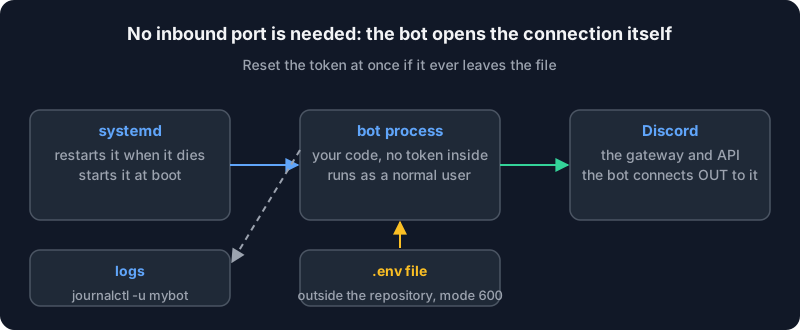
A bot is an ordinary program that logs into Discord with a secret token and then keeps a long-lived connection open to Discord's gateway. Two consequences matter for hosting:
- It connects out. Nobody connects to your bot, so you do not need to open any port. On a server with a firewall that denies incoming traffic, the bot works as is.
- It needs a stable connection and a steady process. If the process dies, the bot goes offline, and nothing brings it back unless you set that up.
1. The code: a minimal bot in each language
With Node.js, the discord.js guide says to use the latest LTS version of Node, and to install the library with npm:
npm init -y
npm install discord.js
A bot that only says it is ready:
import { Client, Events, GatewayIntentBits } from 'discord.js';

const client = new Client({ intents: [GatewayIntentBits.Guilds] });
client.once(Events.ClientReady, (c) => console.log(`Ready as ${c.user.tag}`));
client.login(process.env.DISCORD_TOKEN);
Add "type": "module" to package.json for the import syntax. Check which Node release lines are still supported on the Node.js releases page rather than copying a version number from a blog: it changes every year.
With Python, the discord.py documentation recommends a virtual environment so that the bot's libraries do not collide with the system's:
python3 -m venv bot-env
source bot-env/bin/activate
python3 -m pip install -U discord.py
The page also states the minimum Python version the library supports; read it there, as it moves with releases. In both cases the token comes from the environment, never from a string in the file. That is the next step.
2. The token: the one secret that matters
Whoever holds the token controls the bot, in every server it joined. The discord.js guide is blunt about it: never share the token, purposely or accidentally, and if it leaks (a public repository, a screenshot, a support forum), go back to the Developer Portal, open your application's Bot page and use Reset Token, which invalidates the old one. Then put the new one in your configuration.
Rules that prevent most leaks:
- Keep it out of the code. Read it with
process.env.DISCORD_TOKENoros.environ["DISCORD_TOKEN"]. - Keep it out of Git. If you use a
.envfile for local tests, add.envto.gitignorebefore the first commit. GitHub's documentation on a pushed secret gives the order of operations: rotate the credential first, clean the history later, if at all. - Keep it readable by as few things as possible. On the server the file that holds it should be owned by root with mode 600, as below.
- Do not paste it into a ticket, a chat, or a log line. If you print your configuration while debugging, print everything except the token.
3. Run it under systemd
On most Linux servers, systemd is already the supervisor. It starts the bot at boot, restarts it after a crash, and collects its output. Create a dedicated user so a bug in the bot cannot touch anything else:
sudo adduser --system --group --home /opt/mybot mybot
Put the code in /opt/mybot, install its dependencies there (npm ci or the venv), and put the secret in a separate file:
sudo touch /etc/mybot.env
sudo chmod 600 /etc/mybot.env
sudoedit /etc/mybot.env
with one line, no quotes and no export:
DISCORD_TOKEN=paste-the-token-here
systemd reads this file itself, as root, before it starts the process under its own user, so the bot's user does not need permission to read it. Now the unit, in /etc/systemd/system/mybot.service:
[Unit]
Description=My Discord bot
After=network-online.target
Wants=network-online.target

[Service]
User=mybot
WorkingDirectory=/opt/mybot
EnvironmentFile=/etc/mybot.env
ExecStart=/usr/bin/node index.js
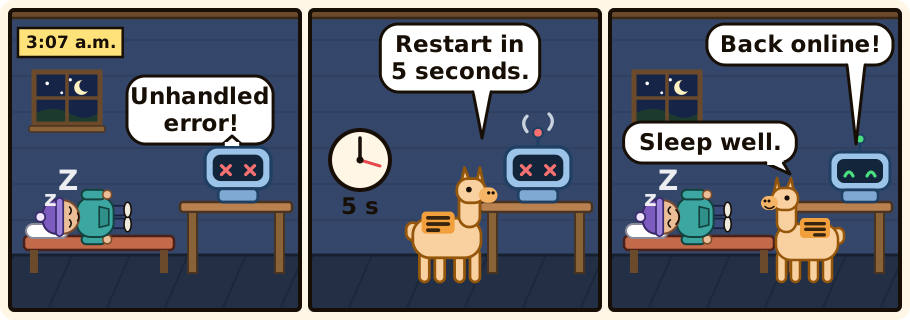
Restart=on-failure
RestartSec=5

[Install]
WantedBy=multi-user.target
For Python, replace the ExecStart line with the interpreter inside the virtual environment, for example ExecStart=/opt/mybot/bot-env/bin/python bot.py. Then load and start it:
sudo systemctl daemon-reload
sudo systemctl enable --now mybot
systemctl status mybot
The settings come from the systemd.service manual: Restart=on-failure restarts on a non-zero exit code, an abnormal termination or a timeout, RestartSec sets the delay between attempts (the default is only 100 ms, so set it), EnvironmentFile loads the variables, and User and WorkingDirectory do what they say. The manual also says that restarts are subject to start rate limiting, StartLimitIntervalSec and StartLimitBurst: a service that crashes again and again in a very short time is left stopped by systemd instead of restarting forever. With a RestartSec of a few seconds you will rarely hit that limit, but if you ever see the service in a failed state with a message about the start request being repeated too quickly, that is what happened, and it means something is badly wrong.
Use Restart=always only if the bot may exit with status 0 on purpose, for example to apply an update, and you want it back anyway.
4. Logs
Whatever the bot prints to standard output and standard error is captured by systemd's journal. Read it with:
journalctl -u mybot -f          # follow live
journalctl -u mybot --since "1 hour ago"
journalctl -u mybot -p err      # errors only
Make the bot log something useful: a line at startup with the library version, a line when it reconnects, and the full error when a command fails, with the guild and command name but never the token or users' private content. A bot that logs nothing turns every incident into guesswork.
5. Why bots die, and what to do about it
Most outages come from a short list:
- An unhandled error. In Node.js an unhandled promise rejection ends the process by default. That is exactly what
Restart=on-failureis for, but fix the cause too: catch errors in command handlers so one bad command does not take the bot down. - A leaked or reset token. The bot logs in with a token Discord no longer accepts. It will fail at every restart until you update
/etc/mybot.envand runsudo systemctl restart mybot. Restarting without updating the file just loops. - Memory growth. A leak, or a cache that never expires, slowly eats the machine. Watch the process's memory in
systemctl status mybotonce a week at first. If it climbs without limit, look for objects stored per message or per user. - An update that broke it. Pin your dependencies (
package-lock.json,requirements.txt) and update on purpose, not on a Friday evening. - The machine itself. A reboot is fine, since the service starts at boot. A full disk is not: logs and databases fill disks.
df -his a good habit.
6. Updating the bot
The simple, reliable routine: copy the new code, install the dependencies, restart.
cd /opt/mybot
sudo -u mybot git pull
sudo -u mybot npm ci
sudo systemctl restart mybot
journalctl -u mybot -n 30
The last line is the important one: look at the log right after a restart, and see that it says it is ready.
When to stop doing this yourself
Running your own machine is a good way to learn, and a bad way to spend a Sunday if you only wanted a bot online. A managed offer takes the supervisor, the restarts and the reboot handling off your hands, at the cost of the freedom to install anything. Look at what the software section of Alama offers for bots, or ask in the Discord before you buy. If you do run your own machine, the first thing to do is the hardening in the first 30 minutes on a fresh Ubuntu server.
The checklist
- Latest LTS Node or a Python virtual environment, dependencies pinned.
- The token in a root-owned file with mode 600, never in the code or Git.
- A systemd unit with
Restart=on-failure,RestartSec, a dedicated user. journalctl -uas your first stop when something looks wrong.- A known procedure to reset the token, tested before you need it.