Эта статья ещё не переведена, вот английская версия.
Pointing your own domain at a website: A, AAAA, CNAME and TXT, explained
You bought a domain, you have a website or a server somewhere, and now a control panel asks you for "records". The vocabulary is old and terse, and the usual advice is "wait 48 hours". This article explains what the records mean, which ones you actually need, why the wait is not a mystery, and how a padlock appears in the browser once the domain points at your site.
The idea in one paragraph
DNS is a distributed phone book. Your domain's authoritative name servers hold the real entries, called resource records. Everyone else asks a resolver (your provider's, or a public one), which asks the authoritative servers and remembers the answer for a while. Changing your site's address means changing a record at the authoritative servers, then waiting for everybody's remembered answers to run out.
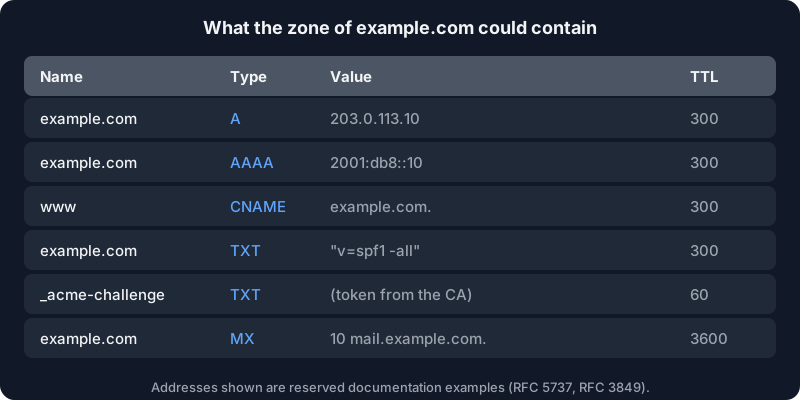
The addresses in the picture are reserved for documentation (RFC 5737 for IPv4, RFC 3849 for IPv6), so they will never belong to anyone. Replace them with yours.
The records you will meet
A maps a name to an IPv4 address. example.com. A 203.0.113.10 means "the server for example.com is at this address". AAAA does the same for IPv6. If your host gives you both kinds of addresses, publish both; if it gives only IPv4, publish only the A record. Never publish an AAAA record that does not lead to your site: visitors with IPv6 would be sent to nothing.
CNAME says "this name is an alias of another name". www.example.com. CNAME example.com. means that whatever example.com resolves to, www gets too. Cloudflare's record type reference puts it plainly: a CNAME maps a name to another, canonical name, and the chain must end in an address record. Hosts use it a lot: "point www at yourapp.hosting-provider.example", and when they move servers, your site follows without you touching anything.
TXT holds free text. It has no effect on traffic. It is used to prove things: that you own the domain (for a search console, a mail provider or a certificate authority), and to publish mail rules such as SPF.
MX says where email for the domain is delivered. If you do not set one, and you want mail, nothing arrives. If you only want a website, you can leave it alone; a plain v=spf1 -all TXT record tells receiving mail servers that no server is allowed to send mail for the domain, which helps against forged messages (it is a signal, not a guarantee).
The rule that surprises everybody: no CNAME at the root
You will want example.com itself (the "apex" or "root") to be an alias to your host, because the host gave you a name and not an address. Most of the time, you cannot. The standard says a CNAME cannot coexist with any other data at the same name. RFC 1912, section 2.4 says it directly: "A CNAME record is not allowed to coexist with any other data". The apex always carries other records, at least the zone's own SOA and NS, so a CNAME there breaks the zone. RFC 2181, section 10.1 repeats the rule, and also forbids pointing an NS or MX record at an alias.
Your options at the root are:
- An A (and AAAA) record with the address your host gives you. This is the simple, universal answer.
- A provider feature that looks like a CNAME at the root, sold as "CNAME flattening", "ALIAS" or "ANAME". The DNS provider resolves the target itself and answers with plain A records. It is not standard DNS, so it depends on your provider.
- Redirect the root to www (a web redirect, not DNS) and keep
wwwas the CNAME.
TTL and the myth of 48 hours
Every record has a TTL, a time to live in seconds. RFC 1035 defines it as the time interval that the record may be cached before the source of the information should again be consulted. That is all "propagation" is: nothing is pushed anywhere. Resolvers around the world simply keep the old answer until its TTL runs out, then ask again and find the new one.
So the wait after a change is at most the old record's TTL, plus any slowness at a particular resolver. If the record had a TTL of 3600, expect up to an hour. The "up to 48 hours" you read everywhere belongs to an older age with long default TTLs, and to a different change: changing the name servers at your registrar, which involves the top-level domain's servers and tends to take longer.
A good habit when you plan a move:
- A day before, lower the TTL of the records you will change to 300 seconds.
- Make the change.
- Once the new site works, raise the TTL again so resolvers cache more and your site stays reachable through short resolver outages.
Checking what the world sees
You do not need to guess. The dig tool, in the dnsutils package on Ubuntu, shows what a given resolver answers:
dig +short A example.com
dig +short AAAA example.com
dig +short CNAME www.example.com
dig +short TXT example.com

# ask a specific public resolver, and the authoritative servers directly
dig @1.1.1.1 +short A example.com
dig +short NS example.com
dig @ns1.your-dns-provider.example +short A example.com
If the authoritative server gives the new answer and your resolver still gives the old one, you are only waiting for a TTL. If the authoritative server itself gives the old answer, the change did not save, or you are editing the zone at a provider that is not the one in the domain's NS records. That last mistake is common: the registrar, where you bought the name, and the DNS host, where the records live, are often two different companies. dig +short NS example.com tells you which one is in charge.
From pointing to HTTPS: how the certificate appears
Once the domain resolves to your server, a browser connecting over HTTPS needs a certificate for that name. Certificate authorities such as Let's Encrypt issue them automatically with the ACME protocol, after you prove you control the name. The Let's Encrypt challenge types page describes the two usual proofs:
- HTTP-01. The software places a file at
http://your-domain/.well-known/acme-challenge/<token>and the authority fetches it. It works only on port 80 and cannot issue wildcard certificates. This is why a firewall that blocks port 80 breaks certificate renewals. - DNS-01. The software publishes a TXT record at
_acme-challenge.your-domainand the authority looks it up. It needs no open port, and it is the only way to get a wildcard certificate (*.example.com), but it needs a way to change your DNS records automatically.
Both proofs require that the domain's DNS already points where you say it does, or that you control the zone. That is why the order of operations is always: records first, certificate second. A host that serves many customers' domains can request certificates when the first visitor arrives instead of in advance; the web server Caddy calls it on-demand TLS, obtains the certificate during the first TLS handshake, and insists that you give it an "ask" endpoint that approves each domain, to stop strangers from making the server request certificates for names it should not serve.
What you get to do as an owner is simple: point the records at your host, wait for the old TTL, open the site, and check that the padlock shows. If the certificate does not appear, check in this order: the A and AAAA records answer correctly, port 80 is reachable if the proof is HTTP-01, and no old AAAA record sends some visitors elsewhere.
A short checklist
- Know who your registrar is and which name servers the domain uses (
dig +short NS). - At the root, an A record (and AAAA if you have IPv6). On
www, a CNAME to the root or to your host's name. - No CNAME on a name that also has MX or TXT records.
- Lower the TTL before a move, raise it after.
- Verify with
dig, from a public resolver and from the authoritative server. - Get HTTPS once the records answer; keep port 80 open for HTTP-01 renewals.
If you need a place to point it at, Alama hosts websites and game servers, and the contact page is the way to ask a question before buying. For the machine that sits behind the domain, the first 30 minutes on a fresh server is the next thing to read.