Dieser Artikel ist noch nicht übersetzt, hier ist die englische Version.
Restart a server that freezes or leaks memory: what the panel does for each
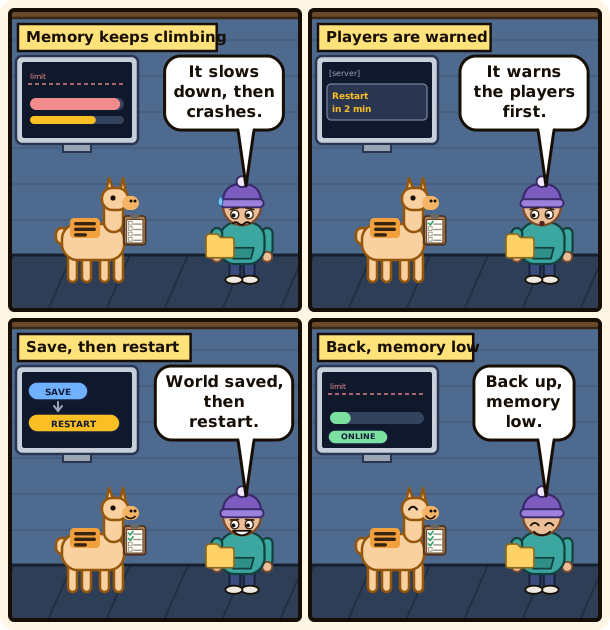
Some servers do not crash, they slow down or stop answering. The panel can restart them for you once you turn it on, but it does not treat the two causes the same way.
Two reasons to restart
- The server stops answering. For the games that report a status, the panel asks every minute. After the silent minutes you chose, the process is stopped and started again, with no warning and no save: a blocked game can do neither.
- Memory stays high. You choose a threshold, as a share of the server's memory, and a time. Above it for that long, the server is warned, saved if you ticked Save the world first, then restarted properly. It needs a memory limit for this.
A slow start is left alone: nothing is counted in a server's first ten minutes.
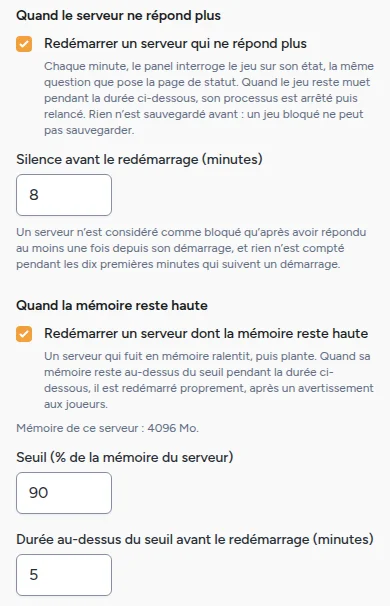 The Auto restart tab, shown here in French: 8 silent minutes, or memory above 90 % for 5 minutes.
Warn first, save first: for a memory restart
For a memory restart only. When the game has a command for it, players are warned in the chat, two minutes ahead by default, with your own message if you wrote one.
With Save the world first ticked, the save command of the game is sent and the restart follows a few seconds later. A game with no save command saves by itself when it stops.
If memory drops back under the threshold during the warning, the restart is cancelled. Games with no command that speaks to players restart without a warning.
What stops it from looping
- Never two automatic restarts within the delay you set: 15 minutes at least, 60 by default.
- A restart has failed when the server is not back after twenty minutes, or when a server restarted for silence is back but still silent.
- After as many failures in a row as you allow, automatic restarts stop on their own and say so. Check the server, then press Resume automatic restarts.
- Nothing is done to a server that is suspended, installing, being restored or being moved.
- Every automatic restart, failure and stop is written in the activity of the server.
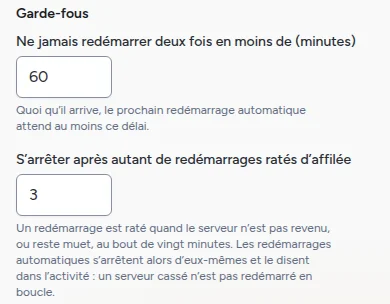 The safeguards, shown here in French: 60 minutes between two restarts, a stop after 3 failures in a row.
A daily restart, if you prefer a clock
Restart every day at, at the top of the tab, makes an ordinary schedule with one restart task, also shown in the Schedules tab. It only restarts a running server: one you stopped stays stopped.
Before you rely on any restart, check that your backups really restore. The list of supported games shows what each game offers.